
AI Retail Execution & Performance Platform
Know what is actually on the shelf.
Every day the system checks whether the merchandiser visited and whether the shelf matches the standard, and assigns any gap as a task to the person responsible. Built for Mongolian FMCG brands and retail chains since 2023.
95%+
Recognition accuracy
With 50+ training images per SKU
600+
Branches daily
Largest deployment
3,000+
Field users
Daily active
92%
Planogram compliance
Up from 65%
* Performance figures are based on a publicly listed client’s 2025 published financial statements.
Use cases
Execution work differs by store type, so the platform is configured per use case at rollout.
Supermarkets
- Staff management and shift assignment
- Daily tasks - opening, closing, cleaning, merchandising
- Store layout builder (floor plans)
- Review-and-approve flow with photo evidence
Convenience chains
- Daily execution monitoring across many branches
- Branch-vs-branch performance league
- Automatic alerts for underperforming branches
- One dashboard - proven on 600+ branches
Brand merchandising
- Visit planning with GPS-verified attendance
- AI shelf recognition and SKU counts
- Planogram compliance and share of shelf
- A unified point-of-sale directory
Suppliers and distributors
- Track your products in partner stores
- Rep routes and visit records
- Empty-space and out-of-stock alerts
- Execution history per point of sale
The real accuracy numbers
One number does not tell you anything.
Vendors in this category publish “95%”, “97%”, “98%” without saying accuracy of what. Recognising a brand is not the same problem as telling one pack size from another. We measure the two separately.
| Measure | Result | Condition |
|---|---|---|
| Brand-level recognition | 95.3% | On products with 50+ annotated training images |
| SKU-level recognition (exact variant and size) | 87.5% | Same conditions. Separating identically-branded pack sizes is measurably harder |
| After human review | Reviewed | Low-confidence detections are routed to a person before the score is final |
| A new SKU | Needs onboarding | Not covered until seed images have been collected for it |
How it works
Every stage from creating a user to producing the report lives in one platform. No jumping between Excel, Google Forms and Viber threads.
Users and access control
Build teams, assign roles (admin, area manager, supervisor, merchandiser, store staff), group by tag, restrict by territory, enforce 2FA, IP and location limits.
Store and branch management
Bulk import from Excel/CSV with validation, pull GPS coordinates from Google My Maps, segment stores by region, chain or performance tier, and assign managers.
Build the audit
Live camera capture only, conditional logic, repeating sections, brand templates, scheduling windows. Questions can be imported in bulk from Excel.
Distribute by email, Viber or link
Send to every branch at once or on a schedule. Unique links need no login; iOS and Android apps and a PWA cover the field team.
Collect with proof of visit
GPS submission matches the nearest store automatically within a 300 m–1 km radius. Geofence compliance confirms the merchandiser really was there. Every action appears on the map as it happens.
AI: recognition and shelf analytics
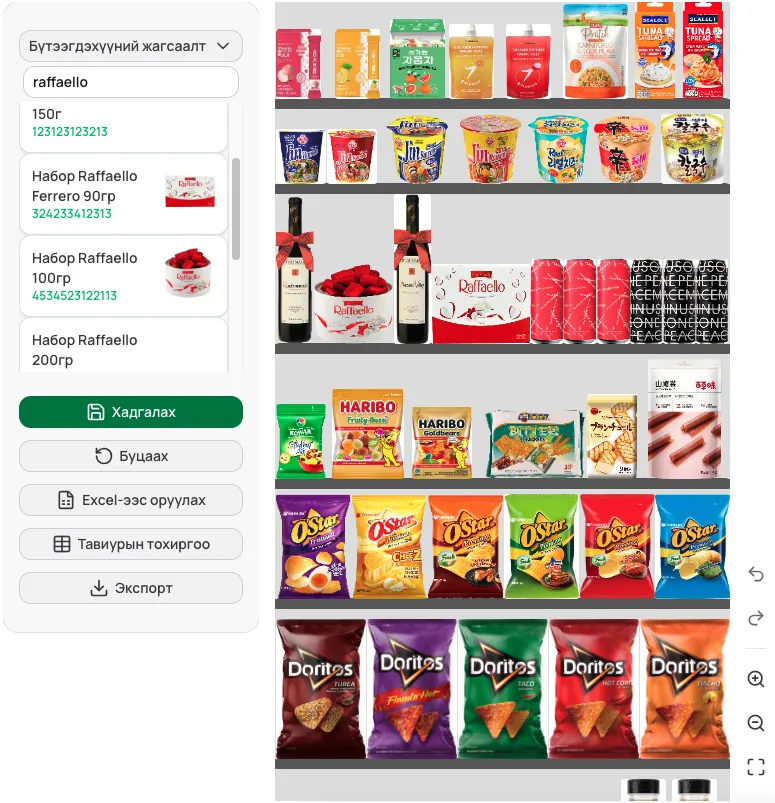
Train a model on your own SKUs (95% performance at 50+ images), measure shelf fill and empty space, count SKUs and facings, build planograms and compare the real shelf against them.
Review and approve
A supervisor checks submissions before they are final, returns them with a reason, and every resubmission is kept in history with quality metrics on approval.
Tasks and compliance
A gap found becomes a task, and the store closes it with photo evidence. Completion rates roll up by store, supervisor and day.
Results, reports and dashboards
Compliance percentage, last-visit dates, heatmap and Sankey reporting, automatic alerts to managers for underperforming stores, and weekly trend lines per branch.
Features in detail
The capabilities in daily use across live deployments, grouped by area.
Users and access control 5
- Teams and users - add, remove, assign roles, bulk-create from Excel, reset access
- Role management - admin, area manager, supervisor, merchandiser, store staff
- Tag management - group users by work area and manage by tag
- Territory limits - a manager sees only their own stores and region
- Security - two-factor authentication, IP and location restrictions, a personal link per user
Store and branch management 5
- Central directory - every store's contacts and location in one place
- Bulk import - stores, coordinates and managers from Excel/CSV, with validation
- Coordinate import - pull GPS locations from Google My Maps
- Segmentation - group stores by region, chain or performance tier
- Manager assignment - link area managers and owners to store groups
Building audits 5
- Execution forms - live-camera-only photos, 20+ configuration options
- Conditional logic - questions that depend on earlier answers, repeating sections
- Categories and branding - organise by topic, apply logo and colours
- Scheduling - open hours, deadlines, active/inactive state
- Excel import - load questions and templates in bulk
Distribution channels 5
- Email - send to every branch at once, with open and click tracking
- Viber - messages and surveys, phone-number matching
- Public links - fill in via a personal link, no login needed
- Mobile apps - iOS, Android and PWA
- Scheduled sends - automatic delivery at a set time
Collection and proof of visit 5
- Multi-step forms - repeating sections, draft saving
- GPS submission - matches the nearest store within a 300m-1km radius
- Geofence compliance - confirms the visit really happened at the store
- Auto-saved photos - stored on upload, counted in reports immediately
- Live map - every action visible on the map in real time
AI analysis 6
- Recognition models - trained on your SKUs, 95% performance at 50+ images
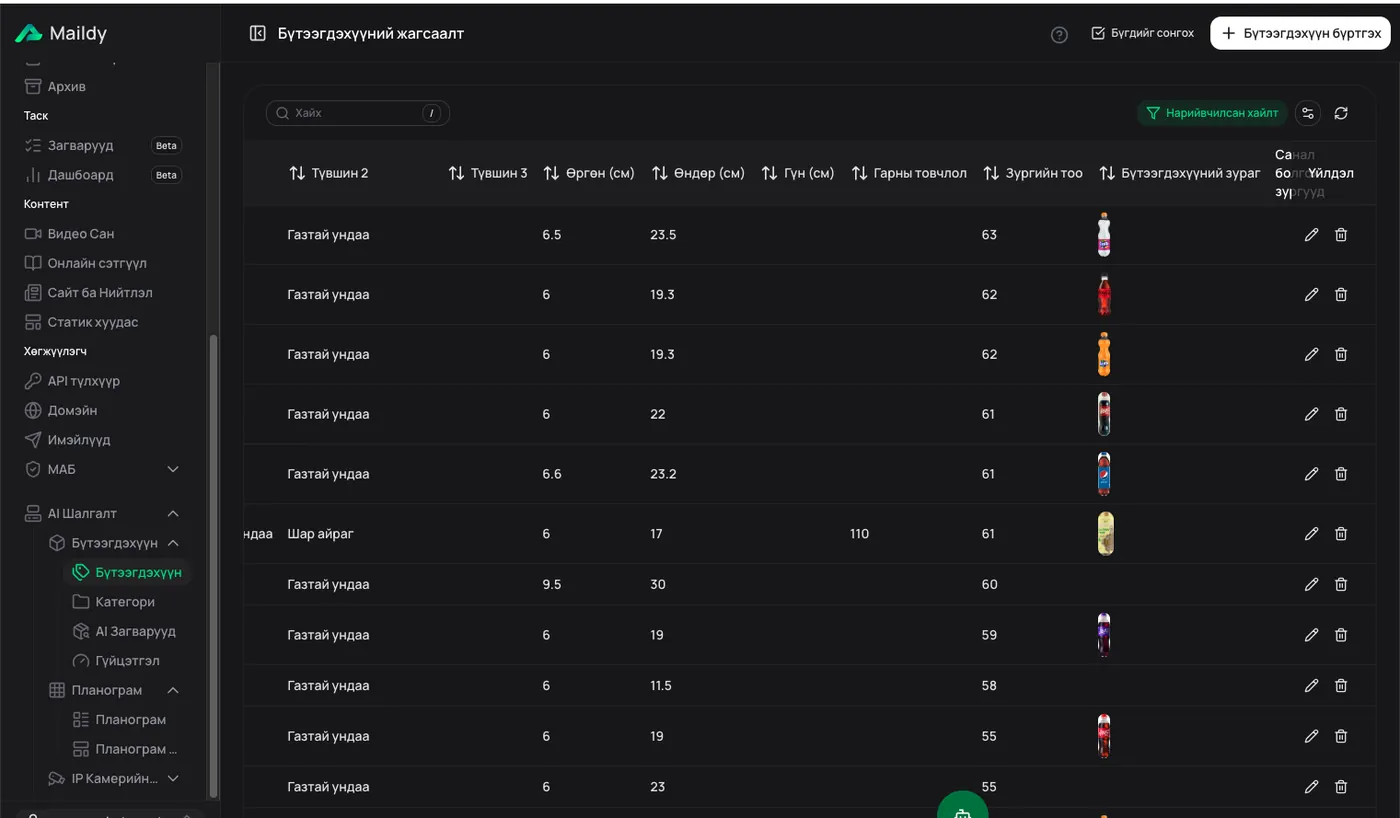
- Annotation tool - mark products on photos to improve the model
- Shelf fill - position and empty-space percentage computed automatically
- SKU and facing counts - quantities read straight from photos
- Planograms - build the standard layout in-app and score reality against it
- Multiple models per survey - coolers, gondolas and shelves scored in one form
Review and approval 4
- Approval flow - a supervisor checks answers before they are final
- Return with reason - send back for resubmission with an explanation
- Pending queue - filter by template, branch and date
- Full history - every resubmission kept with its changes
Tasks and completion 4
- Task templates - reusable checklists
- Automatic creation - daily tasks per store and per person
- Photo evidence - tasks close with proof attached
- Completion board - complete/partial/missed rates by store, owner and day
Reports and dashboards 6
- Store history - compliance rate, last visit, pending work
- Results dashboard - filterable tables, charts, totals by status
- Automatic alerts - managers notified about underperforming stores
- AI insights - anomalies and trends surfaced automatically
- Weekly trends - activity charts per branch
- PDF and Excel export - print-ready reports with photos and scores
How the recognition works
We do not sell a generic model. We train on your SKUs, in your stores, under your lighting.
Trained on your catalogue
Annotate 50+ images per product and recognition reaches 95% performance. When new SKUs arrive, the model is retrained.
Mongolian shelf data
The models learn from Mongolian stores, Mongolian lighting and Mongolian packaging. A global vendor’s generic gallery does not cover this.
It judges, not just counts
SKU counts, facings, empty space, fill rate and planogram compliance — answering not only what is there, but whether it is right.
Low confidence goes to a human
Every low-confidence detection is routed to a review queue, and the human decision feeds back into the next training round.
How this differs from a global vendor
No per-image meter
International vendors bill per image and per SKU model. We charge a flat monthly fee — expanding your coverage does not blow up the budget.
Local SKU coverage
Mongolian brands, small local producers and retailer private labels are absent from global galleries. We add them every day.
We do the implementation
Store list import, role structure, planogram setup, model training and team training — done by us, not handed to a partner.
Support on Mongolian time
When 600 stores hit a problem at 7am, the person who answers is here, in this time zone.
Common questions
How is this different from mystery shopping or a manual audit?
A manual audit covers a sample of stores on a fixed schedule — low coverage, high cost, and the data is already out of date when it arrives. We use your own field team’s daily photos and score every store on every visit.
Does this replace our field team?
No. It makes their work measurable. The merchandiser swaps the paper checklist for a phone.
Your model has never seen our SKUs.
The first phase of any rollout is training the models on your catalogue. Training a model is very easy.
Will it work in stores with poor connectivity?
The app captures offline and uploads when the connection returns. The rep never has to make a second trip.
What happens when a photo is bad?
The camera checks for blur and exposure at capture time and asks for a retake. Quality is filtered before recognition runs at all.
Start with a pilot
A measurable pilot on your most important category and a selected set of stores. You see recognition performance on real photos within the first week.